
Three situations make Avoma worth a serious look, and they are all variations on the same problem: important conversations happen faster than anyone can write them down.
- A small sales team that keeps losing deal context between calls. Reps run back-to-back demos, and by Friday nobody remembers who asked about the security review or which prospect mentioned a competing vendor. Avoma joins the meetings, transcribes them, and produces structured notes with action items, so the detail survives past the conversation.
- A manager who wants to coach reps without sitting in on every call. Instead of shadowing meetings live, a manager can review transcripts, jump to specific moments, look at talk-time patterns, and score calls against a defined playbook. That turns coaching from a scheduling problem into an asynchronous review.
- A revenue operations owner tired of reps forgetting to update the CRM. Avoma can push call summaries and notes into Salesforce or HubSpot automatically, which reduces the manual data entry that reps routinely skip and that leaves pipeline reports inaccurate.
Those are the recurring jobs Avoma is designed for. The rest of this review works backward from them to the features that deliver, then covers who should and should not buy it, what it costs, and where the limits are.
The Machinery Behind the Use Cases
The foundation is automatic recording and transcription. Avoma connects to the common conferencing tools, Zoom, Google Meet, and Microsoft Teams, and also lists support for GoToMeeting and Highfive. It joins the call as a participant and captures audio, then transcribes it. Avoma states transcription support for 40 or more languages, which matters for teams selling across regions rather than in a single market. The transcript is the raw material for everything else, so accuracy here sets the ceiling on how useful the downstream analysis is.
On top of the transcript, the AI note-taking layer generates summaries with what Avoma calls smart chapters and lets you apply custom templates. The practical value of templates is consistency: if every discovery call is summarized against the same structure, your notes become comparable and searchable instead of a pile of freeform text. Avoma also offers an AI assistant it markets as "Ask Avoma" for querying across past conversations, which is aimed at the "what did the customer say about pricing three weeks ago" question.
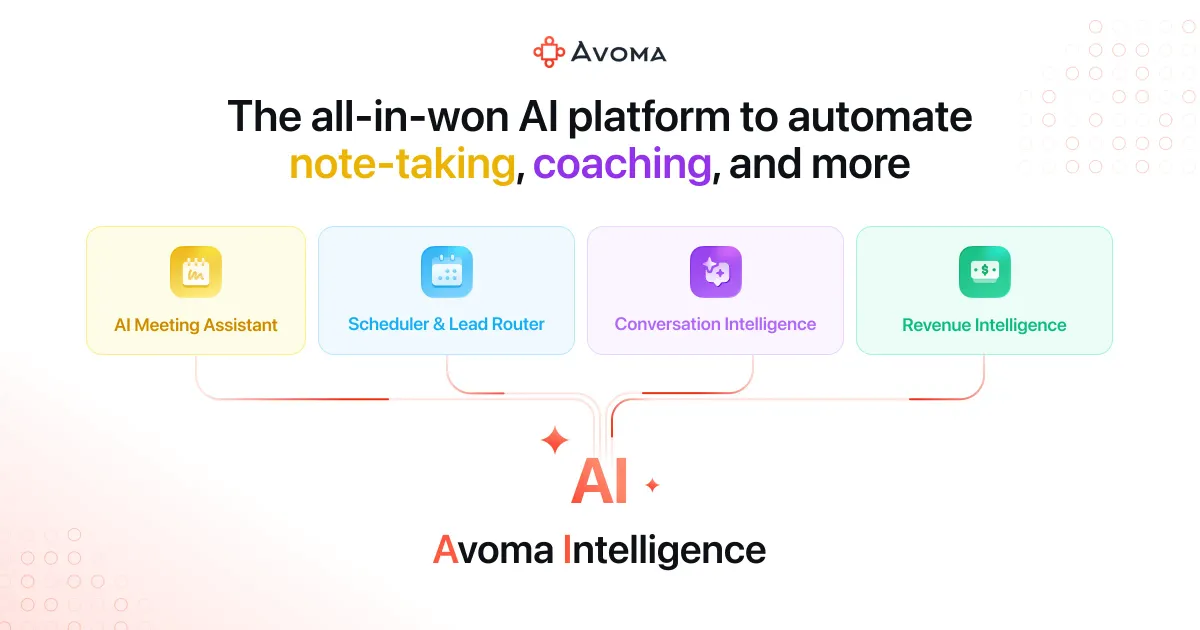
The coaching and analysis capabilities are where Avoma differentiates from a plain transcription tool. Conversation intelligence covers talk-pattern analysis, keyword tracking, and engagement insights, the kind of signals a manager uses to spot a rep who talks 80 percent of the time or never surfaces next steps. Call scoring evaluates recordings against sales playbooks, and the coaching tools include feedback workflows and battle cards. Beyond individual calls, Avoma markets revenue intelligence features, deal risk alerts, pipeline management, win-loss analysis, and forecasting, that roll conversation data up into a management view. It is worth being clear-eyed here: these forecasting and risk features are only as good as the data hygiene and volume behind them, so a two-person team will get far less from them than a 40-rep organization.
Two operational features round out the platform. Follow-up automation drafts emails and handles CRM data entry after the call, and there is a scheduling and lead-routing component with 1:1, group, and round-robin booking pages plus qualification rules. The integration list is broad for a tool in this category: CRMs including Salesforce, HubSpot, Pipedrive, Copper, Zendesk Sell, and Zoho CRM; dialers such as Aircall, Dialpad, RingCentral, Zoom Phone, Groove, and Outreach; and collaboration tools including Slack and ClickUp. If your stack already includes one of these, the CRM sync and dialer capture are the features that turn Avoma from a note-taker into part of the workflow. You can compare it against other options in the AI meeting assistant category if you want a sense of the field.
Who This Actually Fits
Avoma is built for revenue and customer-facing teams rather than general note-taking. The sweet spot is a sales organization or customer success group that runs a high volume of external calls, has a defined sales process worth measuring against, and uses a CRM it wants kept current. Sales managers and RevOps roles get the most leverage because the coaching, scoring, and forecasting layers are aimed squarely at them.
It is a weaker fit for a few groups. If you only need a transcript of internal standups and one-on-ones, most of what you pay for, the intelligence and revenue features, goes unused, and a simpler recorder would do. Solo users and very small teams should also weigh the price against how much of the analytics they will realistically consume. And if your calls happen on a platform Avoma does not list support for, confirm coverage before committing.
What It Costs
Avoma prices per "recorder" seat, with viewers and collaborators always free, which is a genuinely useful detail: managers or teammates who only need to read notes and watch clips do not consume a paid seat. Billing annually saves meaningfully over monthly, with Avoma citing up to 33 percent.
| Plan | Annual (per recorder seat/mo) | Monthly | Notes |
|---|---|---|---|
| Startup | $19 | $29 | Up to 25 paid seats; unlimited AI Meeting Assistant and 1:1 scheduling |
| Organization | $24 | $39 | Up to 100 seats; adds custom AI notes, group scheduling, limited conversation intelligence |
| Enterprise | $39 | Annual only | Minimum 10 seats; adds access controls, SSO, HIPAA compliance, dedicated success manager |
The base plan is deliberately lean. The heavier analytics come as paid add-ons: Conversation Intelligence at $29/seat/month annual ($35 monthly), Revenue Intelligence at the same $29/$35, and a Lead Router at $19/$25. Avoma discounts bundles, 10 percent off any two add-ons, 15 percent off all three. There is a 14-day trial of the Organization plan with all add-ons enabled and no credit card required. The important budgeting takeaway is that the headline $19 figure is the floor, not the realistic cost for a team that wants coaching and pipeline analytics; a fully loaded seat with conversation and revenue intelligence lands closer to $48 per month on annual billing before bundle discounts.
Where It Falls Short
The add-on model is the main friction. Buyers drawn in by the low base price can be surprised that the conversation intelligence they came for is a separate line item, and stacking modules changes the math considerably. The dependence on transcription quality is another honest limitation of any tool in this space: accents, crosstalk, and poor audio degrade the transcript, and every summary, score, and forecast inherits those errors. The revenue and forecasting features also need scale and disciplined process to pay off, so they can feel like paying for capacity you do not yet use. Finally, HIPAA compliance and SSO are reserved for the Enterprise tier with its seat minimum, which pushes regulated or security-sensitive smaller teams toward the top plan whether or not they need everything else in it.
The Bottom Line
Avoma is a coherent, well-integrated option for sales and customer success teams that treat calls as a core business asset and want the full lifecycle handled: capture, summarize, analyze, coach, and sync to the CRM. Its per-seat pricing with free viewers and its broad CRM and dialer integrations make it practical to roll out across a revenue org. The catch is that its most compelling capabilities, conversation and revenue intelligence, sit behind add-ons, so evaluate the total configured cost rather than the entry price, and use the 14-day trial to confirm transcription quality on your actual calls before committing. For a plain meeting recorder, it is more than you need; for a revenue team, it is aimed directly at your workflow. Browse more options in the tools directory or read comparisons on the blog.
Common Questions About Avoma
Which meeting platforms does Avoma support?
Avoma lists support for Zoom, Google Meet, and Microsoft Teams, along with GoToMeeting and Highfive. It can join these meetings automatically to record and transcribe them.
Is conversation intelligence included in the base price?
Not fully. The Organization plan includes limited conversation intelligence, but the full Conversation Intelligence capability is a paid add-on at $29 per seat per month on annual billing ($35 monthly). Revenue Intelligence is a separate add-on at the same price.
Does Avoma have a free option?
Viewers and collaborators are always free, so teammates who only read notes or watch call clips do not need a paid seat. Avoma also offers a 14-day trial of the Organization plan with all add-ons enabled and no credit card required. A permanent free recording tier is not documented on the pricing page.
Can Avoma update my CRM automatically?
Yes. Avoma integrates with Salesforce, HubSpot, Pipedrive, Copper, Zendesk Sell, and Zoho CRM, and its follow-up automation can handle CRM data entry after a call so reps do not have to log notes manually.
What languages can Avoma transcribe?
Avoma states transcription support for 40 or more languages, which suits teams running calls across multiple regions rather than a single market.