
Krisp is one of the few audio tools that earned its reputation on a single job done well before it tried to do anything else. For years it was the thing you turned on when a leaf blower started outside during a client call. That focus is worth keeping in mind while reading the rest of this review, because the product has since grown into a broader AI meeting assistant, and the noise-cancellation core still explains most of why people install it in the first place.
What Krisp is trying to be now
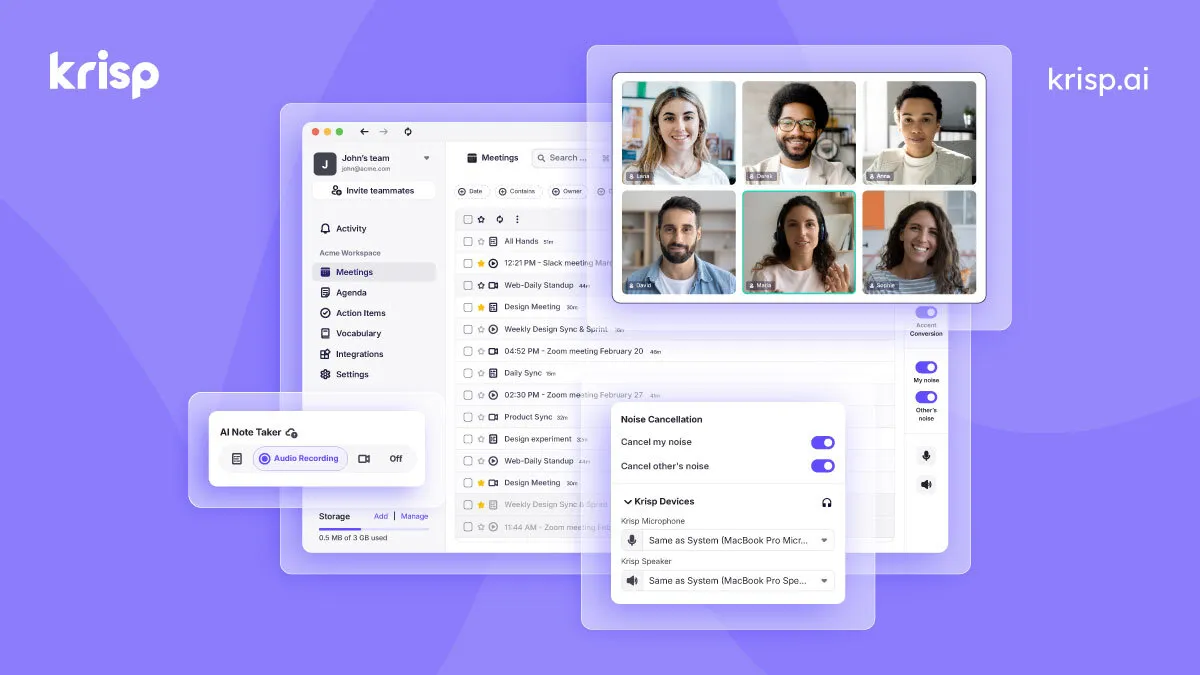
The short version: Krisp sits between your microphone and whatever conferencing app you use, and it cleans up the audio before it reaches the other side. The tagline the vendor uses is "AI noise cancellation and meeting assistant for clearer calls," and that pairing is deliberate. The noise removal is the entry point; the meeting features are the reason Krisp wants you on a paid plan. It runs as a desktop app on Windows and Mac, with mobile apps and a Chrome extension, and it is designed to work independently of any specific meeting platform.
That platform independence is the detail I would emphasize first. Zoom, Microsoft Teams, and Google Meet all ship their own noise suppression, so a fair question is why you would add another layer. The answer is consistency. Because Krisp processes audio at the operating-system level rather than inside one app, the same cleanup applies whether you are on Zoom, Teams, Google Meet, Slack Huddles, Discord, or Webex. If your week is split across several of these, you get one behavior instead of six different suppression algorithms of varying quality.
The core audio work
Krisp describes three related capabilities on the audio side: noise cancellation, echo removal, and background voice cancellation. Noise cancellation handles the obvious cases, such as keyboards, fans, traffic, and children. Echo removal targets the hollow, reverberant sound you get in hard-surfaced rooms. Background voice cancellation is the more interesting one: it aims to strip out other people talking near you without needing a special headset, which matters in shared homes, open offices, and cafes where a directional microphone alone will not save you.
The vendor also states that English transcription can run on-device, and that the private on-device transcription option is reserved for the Enterprise tier. On-device processing is the kind of claim that only matters until it suddenly matters a lot, for example in regulated industries or when a legal or compliance team asks where meeting audio is being sent. It is worth being precise here: Krisp offers on-device English transcription, while transcription in its other supported languages is handled server-side. If keeping audio off external servers is a hard requirement for you, that distinction is the one to confirm against your own policy.
Where the AI features go deeper
The meeting-assistant side is what turns Krisp from a utility into something closer to a workflow tool. It transcribes conversations, generates meeting summaries, and tracks action items in a centralized view. Recording can be done in transcript-only, audio, or video modes, which is a practical distinction because a transcript-only capture is far less sensitive to store and share than a full video recording.
The feature most likely to surprise people is real-time accent conversion. Krisp offers this on both the speaker and listener side, and it is positioned prominently in the plans. This is genuinely useful in support and sales contexts where clarity across accents affects comprehension and outcomes, but it is also the feature I would treat with the most measured expectations. Accent conversion is a hard problem, results vary by voice and language pair, and it is metered by time rather than offered without limit, which tells you the vendor knows it is compute-heavy. Try it against your own voice before assuming it will meet a specific bar.
Krisp also connects outward. It integrates with Google Calendar and Outlook for scheduling context, with Salesforce and HubSpot on the CRM side, and with Zapier for wider automation, alongside tools like Loom. The CRM links are the ones that pay off for revenue teams, because a summary and action items that flow into Salesforce automatically are worth more than notes that sit in a separate app nobody reopens. You can browse similar options in the Voice & Audio AI category if you want to compare integration depth across tools.
Living with it day to day
Usability is where Krisp benefits from its narrow origins. Because it acts as a virtual microphone and speaker, setup is mostly a matter of selecting Krisp as your input device inside your meeting app once, after which it stays out of the way. There is a real cost to running any always-on audio processing layer, though: it consumes CPU, and on older or lower-powered machines that overhead is noticeable, particularly if you stack noise cancellation, transcription, and accent conversion at the same time. On a modern laptop this is a non-issue for most people; on a five-year-old machine it is worth watching.
The other honest caveat is that a meeting assistant only earns its keep if you actually use the output. Automated notes and action items are helpful when someone reviews and routes them; they become digital clutter when they are generated for every call and read by no one. Krisp gives you the capture; the discipline of turning that into follow-through is on you.
How the plans are structured
Krisp splits its pricing into three product lines, and it helps to know which one you are actually buying. The mainstream offering is Meeting AI. There is also Call Center AI aimed at contact centers, and a Developers line that exposes voice isolation and related capabilities as APIs. For an individual or a typical team, Meeting AI is the relevant one.
Within Meeting AI, the vendor lists a free trial (documented on the pricing page as 7 days, no credit card required) that unlocks unlimited transcription, noise cancellation, recording, and AI notes with limited accent conversion. Paid tiers are billed per user:
| Plan | Annual price | Monthly price | Notable inclusions |
|---|---|---|---|
| Core | $8/user/mo | $16/user/mo | Unlimited AI note-taker, noise cancellation, transcription, recording; 1 hr/day accent conversion; 10 GB storage; mobile app |
| Advanced | $15/user/mo | $30/user/mo | Everything in Core, plus 4 hrs/day speaker-side accent conversion (unlimited listener side); Salesforce and ConnectWise integrations; 60 GB storage; manager view |
| Enterprise | Custom | Adds HIPAA, BAA signing (100+ seats), SOC 2 report access, private on-device transcription of recordings, dedicated account manager, unlimited storage (SSO/SCIM and SOC 2 Type II are already on Advanced) | |
A few things stand out. The annual commitment roughly halves the per-user cost, which is a strong nudge toward yearly billing. Accent conversion is the main lever separating Core from Advanced, along with the Salesforce and ConnectWise integrations and SSO/SCIM, which the pricing page lists on Advanced and Enterprise but not Core; if you do not need any of those, the case for Advanced weakens considerably. On the compliance side it pays to read the tiering carefully. SOC 2 Type II and GDPR are listed across the paid Meeting AI tiers, so those are not Enterprise-only. What is gated behind Enterprise is the heavier regulated-buyer set: HIPAA compliance, BAA signing (noted as available for teams of 100-plus seats), SOC 2 report access, and private on-device transcription of recordings. A healthcare or finance team that needs a signed BAA or HIPAA coverage should therefore assume a custom-pricing conversation rather than self-serve signup, even though the baseline SOC 2 attestation is present lower down the ladder. Note that the older public description referenced an ongoing free plan; the current pricing page documents a time-limited free trial instead, so verify the exact terms at signup. The Call Center AI line starts at $10 per agent per month on annual billing, if that is the product you need.
Who it fits and who can skip it
Krisp makes the most sense for people who take a high volume of calls from imperfect environments and want the audio to be reliably clean without buying dedicated hardware: remote workers, sales and support staff, and consultants who move between rooms. The meeting-assistant layer adds value for teams that will genuinely act on transcripts and route action items into a CRM. If you work in a quiet, controlled space and your conferencing app's built-in suppression already sounds fine, the audio half of Krisp is redundant, and you would be paying mainly for the notes and transcription, which are worth comparing against dedicated meeting-note tools before committing.
Weighed as a whole, Krisp is a mature, focused product that has expanded without losing the thing it was originally good at. The pricing is transparent for the self-serve tiers, the platform-agnostic design is a real advantage, and the honest limits are the CPU overhead, the metering on accent conversion, and the fact that the strongest privacy and compliance controls are gated behind Enterprise. Start with the trial, keep your specific noisy environment and required integrations in mind, and you will have a clear read on whether it belongs in your stack. For broader comparisons, the full tool directory and the blog are good next stops.