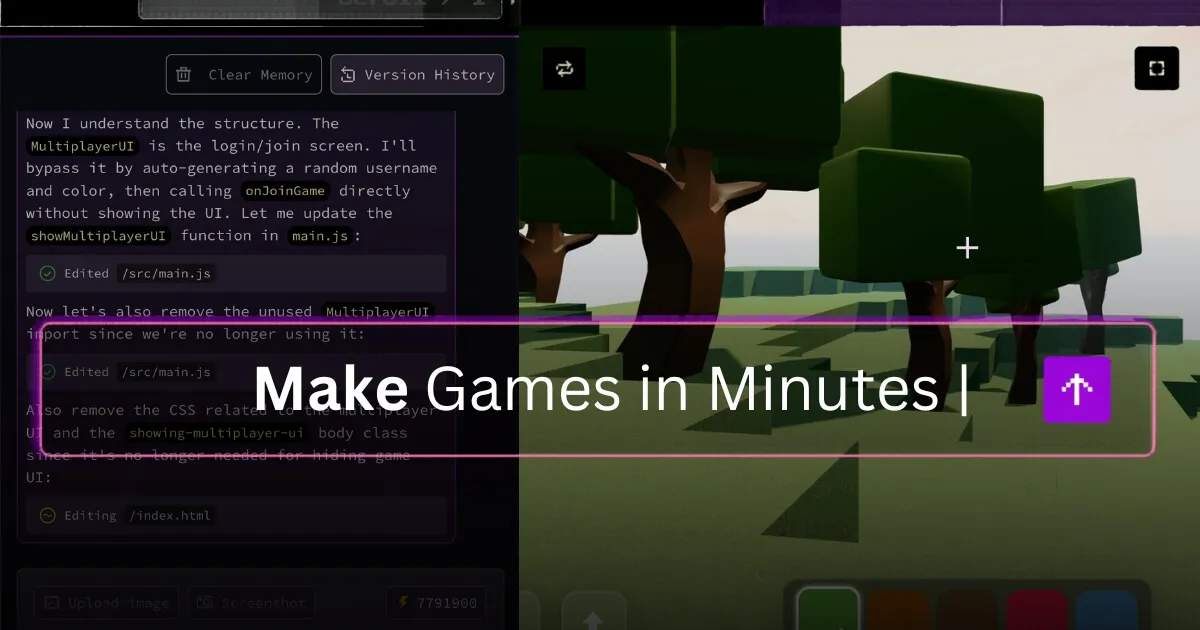

Describe a game, get a game
Rosebud AI is built around a single idea: you should be able to make a game by describing it. The platform calls this vibe coding. You type what you want, or start from a template, and the AI generates a playable 3D game or interactive world rather than asking you to write engine code. It lowers the barrier for people who have game ideas but never learned a language like C# or Lua.
How vibe coding works here
The flow starts with a prompt. You describe your game concept in plain language, and Rosebud assembles the logic, scene, and behavior. From there you keep talking to it, refining mechanics and content through conversation rather than hand-editing scripts. Templates give you a running start when you would rather adapt something than begin from a blank page. The result is a loop where iteration happens in natural language, which is faster to learn than a traditional engine and friendlier to non-programmers.
What you can build
3D games and worlds
The headline capability is the AI Game Creator paired with a 3D Game Maker, used to generate 3D environments and playable games. This is the part that places Rosebud alongside other 3D creation tools, even though its angle is generation through description rather than manual modeling.
AI NPCs
Rosebud can populate a game with AI non-player characters, which is one of its more distinctive features. NPCs driven by AI can react and converse in ways that scripted dialogue trees cannot, which is a natural fit for a platform already built on natural-language interaction.
Narrative and 2D tools
Beyond 3D, Rosebud spans a range of story-driven formats: a Visual Novel Maker, an RPG Maker, an Interactive Story Maker, and an AI Storybook. There is also a Sprite Sheet Generator and PixelVibe for 2D asset creation. That breadth means the platform suits storytellers and educators, not only 3D builders. The Sprite Sheet Generator is a practical touch for anyone making 2D or retro-styled games, since hand-drawing every animation frame is one of the most tedious parts of that work. PixelVibe extends the same generate-from-a-prompt idea to the art itself, so a creator can produce both the game logic and the assets that fill it inside one platform.
Templates as a starting point
Templates deserve a mention of their own. Rather than every project beginning empty, you can pick a template that already has a genre and structure in place, then steer it toward your idea. For beginners this removes the intimidating first step, and for experienced creators it speeds up prototyping. It also doubles as a learning aid: poking at a working template teaches you how the pieces fit together faster than reading documentation would.
Who it is for
Rosebud targets a wide range of skill levels, from complete beginners trying game development for the first time to more experienced creators who want to prototype quickly. It is a strong fit for educators and students, since it turns game-making into an accessible classroom activity, and for content creators interested in interactive storytelling. Web developers also appear in its intended audience.
A fair expectation to set: AI-generated, prompt-driven games trade fine-grained control for speed and accessibility. If you need pixel-perfect mechanics, custom shaders, or the deep tooling of a mature engine, a platform like this is better for prototypes, learning, and lighter interactive experiences than for shipping a complex commercial title. That tradeoff is exactly what makes it approachable.
Pricing
Rosebud appears to offer both free and premium access, with templates and core features available to get started. The site does not lay out a detailed price list on its main page, so the most reliable move is to check Rosebud's current plans directly before assuming what a given tier includes. Avoid budgeting around any figure you have not confirmed on the official site.
Verdict
Rosebud AI is one of the clearer expressions of the vibe coding idea applied to games: you describe, it builds, you refine in plain language. The AI NPCs and the spread of narrative makers give it personality beyond a generic prompt-to-game gimmick. For learning, teaching, jamming on ideas, and interactive storytelling it is genuinely useful. Treat it as a fast path from idea to playable prototype rather than a replacement for a full production engine, and it delivers.