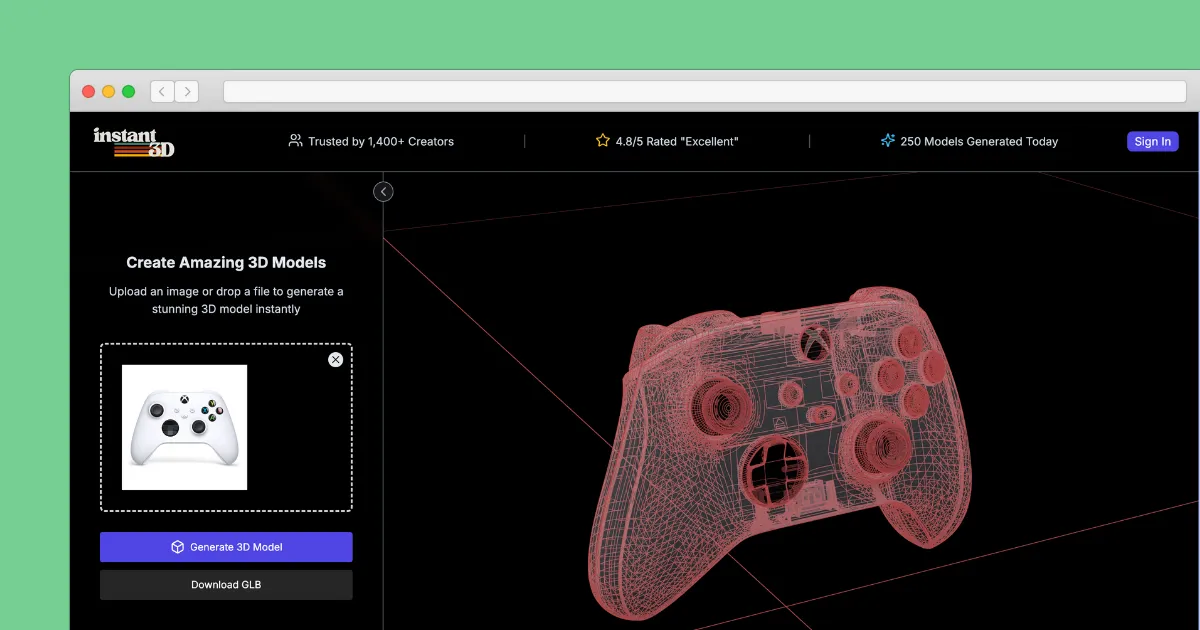

What Instant3D AI is
Instant3D AI is an AI 3D model generator that converts text prompts or images into 3D models, fast. Type a description or upload a picture and the system returns a model, typically in about 15 to 25 seconds, aimed at people who want assets without sitting down to model them by hand. It is pitched at a wide range of users, from game developers and character designers to product visualization folks, 3D printing hobbyists, real estate professionals, and complete beginners who have never opened a modeling program.
The core promise is speed plus accessibility. The barrier to 3D has always been the software learning curve, and Instant3D AI shortcuts that by letting an idea or a reference image become a usable mesh in seconds, with minimal manual cleanup expected afterward.
How it works
There are two main entry points. Text to 3D generates a model from a written prompt, and Image to 3D converts a 2D image into a 3D model. Once a model exists, you can open it in the browser-based Online 3D Viewer to upload, inspect, edit, and explore the result without installing anything. That browser-first approach keeps the whole loop, generate then review, in one place.
AI Character Generator
A dedicated character feature creates 3D characters from character turnarounds, which is the standard reference sheet animators and game artists use. Turning a turnaround into a 3D character is a meaningful time saver for anyone building a cast of game or animation characters.
Auto Remesh
Raw AI-generated geometry is not always clean, so Auto Remesh refines the mesh toward production quality. Good topology is what separates a model you can actually rig, print, or drop into an engine from one that just looks fine in a preview, so this step does real work.
3D Tools and AI Studio
Beyond generation, Instant3D AI bundles AI-powered editing, sculpting, and optimization under its 3D Tools, and an AI Studio space for designing and prototyping models. These let you iterate on a result instead of regenerating from scratch every time something is slightly off.
Compatibility and outputs
The platform references working with tools like Blender and Unity, which signals it is meant to feed into real production pipelines rather than being a closed sandbox. One honest caveat: the site does not spell out the exact export file formats, so if your pipeline depends on a specific format such as GLB, FBX, OBJ, or STL, it is worth confirming directly before committing. For 3D printing or engine import in particular, format support is the detail that makes or breaks a workflow.
Who it is for
Instant3D AI suits indie game developers prototyping assets, designers who need quick character or product concepts, hobbyists experimenting with printable models, and beginners who want results without learning Blender first. The team ships weekly feature updates driven by user feedback and AI research, so the tool moves quickly. Professionals with strict topology or UV requirements may still need to refine output further, which is where Auto Remesh and the editing tools earn their keep, but heavy production work can demand more control than fast generation alone provides. A practical way to use it is for blockouts and concept passes, getting a rough shape in seconds so you can judge an idea before investing manual modeling time in the version that ships.
Pricing
Instant3D AI uses a freemium model. You get a small number of free image generations to test it, then unlimited generations run around 10 dollars per month, and the service mentions a refund policy. The free tier is enough to judge whether the output quality and speed fit your needs before paying. As always, verify current pricing and the refund terms on the site, since plans can shift.
Verdict
Instant3D AI is a strong pick when speed and a gentle learning curve matter more than fine-grained control. Generating a model in under half a minute, then cleaning it with Auto Remesh and viewing it right in the browser, is a genuinely smooth loop for prototyping and for newcomers. The main things to check before relying on it are the available export formats and whether the mesh quality meets your specific pipeline, especially for printing or engine work. For quick ideation, character roughs, and getting non-experts into 3D, it delivers.