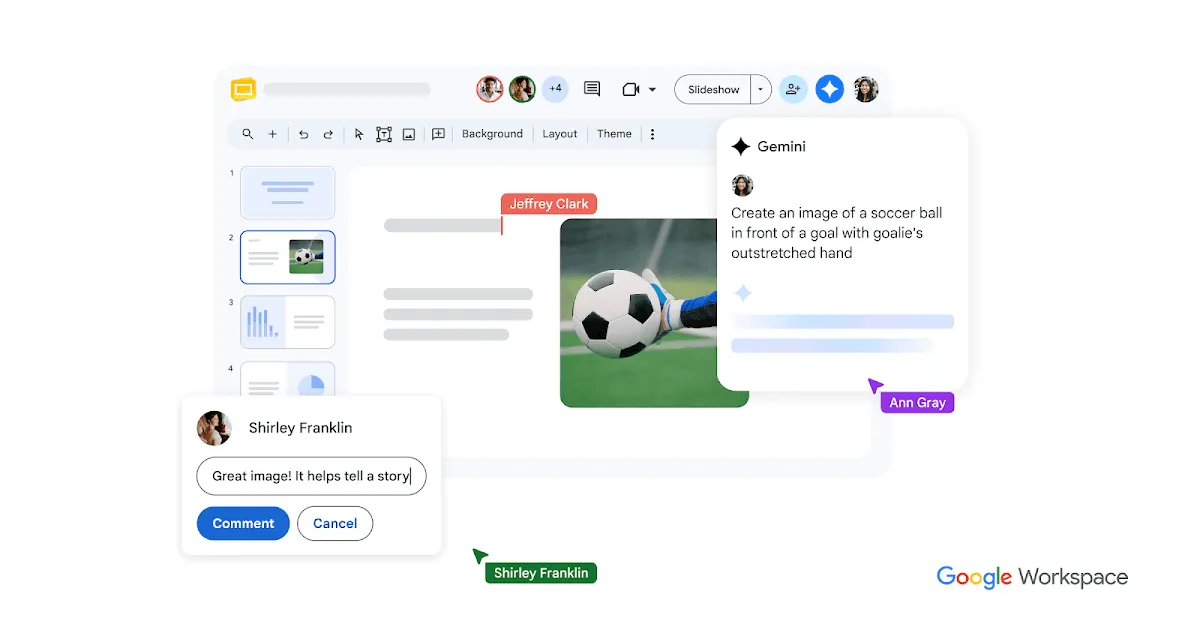

TL;DR: Google Slides is a free, browser-based presentation tool inside Google Workspace, and its AI story is essentially Gemini bolted onto a mature collaboration app: generate draft slides from a prompt, create images with Imagen, and lean on design suggestions. If you already work in Google Docs, Sheets, and Drive, this is the path of least resistance; if you want a purpose-built AI deck generator with polished templates out of the gate, treat the AI here as a helpful assistant rather than the main event.
What the AI actually does inside Slides
It helps to separate two things that often get blurred: Google Slides the editor, and Gemini the AI layer. The editor has existed for years as a competent, no-install alternative to PowerPoint. The newer part is the Gemini integration, and according to the vendor's own description that integration covers three concrete jobs.
- Slide generation from text prompts. You describe what you want and Gemini drafts slides for you. This is genuinely useful for getting past a blank canvas, but the realistic expectation is a rough scaffold you then edit, not a finished deck you present untouched.
- AI image generation via Imagen. Rather than hunting stock photos, you can generate imagery directly in the slide. That is convenient when you need a placeholder visual or a concept image, and it keeps you from tab-switching to a separate tool.
- Writing assistance and smart layout/design suggestions. The app nudges you toward cleaner arrangements and can help with copy. Design suggestions are best thought of as a floor for visual quality, not a ceiling.
The reason this matters is workflow friction. AI features that live where you already build the deck get used; AI features in a separate app tend to get abandoned. Because generation, imaging, and editing all happen in one editor, the AI is more likely to become part of how you actually work.
A fair caveat: the facts here describe what the AI does, not how well. There are no published benchmarks, accuracy figures, or user counts in the vendor material, so I won't pretend to grade output quality. Expect to review and revise anything Gemini produces, the same as with any current generative tool.
Collaboration and the ecosystem pull
The strongest part of Google Slides has little to do with AI. Real-time multi-user collaboration, inline commenting, and version history are the core of why teams pick it, and the AI features arrive on top of that foundation rather than replacing it. Multiple people can edit the same deck simultaneously from any device, which is the behavior most cloud-native tools now imitate but Google shipped early and refined over time.
It also connects to Google Docs, Sheets, and Drive, so pulling a chart from a spreadsheet or storing decks alongside the rest of your files is straightforward. If your organization already runs on Google Workspace, that integration is the quiet reason Slides tends to win by default. For teams evaluating this against other options in the AI presentation maker category, the ecosystem fit often outweighs individual feature comparisons.
On portability, Slides supports import and export compatibility with Microsoft PowerPoint. That two-way exchange is important if you collaborate with PowerPoint-heavy partners or clients. It is worth setting expectations: cross-format conversions between any two presentation apps can shift fonts, spacing, or animations, so plan to spot-check a deck after a round trip rather than assuming pixel-perfect fidelity.
Pricing, and where the AI sits behind a paywall
Google Slides uses a freemium model. The base app is free for personal use with a Google account, which covers the editor, collaboration, and PowerPoint import/export for most individuals. Business and enterprise capabilities are bundled into Google Workspace paid plans.
The important nuance for anyone reading this as an "AI presentation" review: the Gemini AI features inside Slides are not part of the free tier as described. They require either a Gemini for Workspace add-on or a Google One AI Premium subscription. In other words, the collaborative presentation tool is free, but the AI generation and Imagen features sit behind a paid subscription.
Exact prices are not listed in the material I'm working from, so I won't quote dollar figures. Check the official Google Slides product page for current subscription costs before you budget around the AI features, and confirm which specific add-on unlocks the capabilities you need.
Who it fits, and who should look elsewhere
Based on the vendor's own positioning, this is aimed at students, educators, and business professionals who want a free, collaborative presentation tool with optional AI content and image generation. That framing is honest.
You are a good fit if:
- You already use Gmail, Docs, Sheets, or Drive and want your decks in the same place.
- Collaboration and commenting matter more to you than template polish.
- You want AI as an accelerator for drafts and images, and you are comfortable editing what it produces.
- You need a genuinely free tool for the core editing and sharing, with the option to pay for AI later.
You should probably look elsewhere if:
- You want AI-first deck creation where a single prompt yields a designed, presentation-ready result with minimal editing.
- You need the AI generation without paying, since that capability is gated behind a subscription.
- Your organization is deeply committed to the Microsoft stack; while Slides handles PowerPoint files, staying native usually avoids conversion headaches.
- Advanced motion design, precise typography control, or brand-locked templates are central to your work.
If you're still comparing, it's reasonable to trial the free editor first, then decide whether the paid AI add-on earns its keep for your specific volume of deck-building. Browse the wider tools directory or read more evaluations on the blog before committing to a subscription.
Frequently Asked Questions
Is Google Slides free to use?
The core app is free for personal use with a Google account, covering editing, collaboration, and PowerPoint import/export. Business and enterprise features come with paid Google Workspace plans.
Do the AI features come with the free version?
No. The Gemini AI features inside Slides require either a Gemini for Workspace add-on or a Google One AI Premium subscription, so the AI generation and image creation are not part of the free tier.
What can the Gemini integration actually do in Slides?
According to the vendor, it generates slides from text prompts, creates images via Imagen directly in the slide, and provides writing assistance alongside smart layout and design suggestions.
Can I work with PowerPoint files in Google Slides?
Yes. Google Slides supports import and export compatibility with Microsoft PowerPoint, though as with any cross-format conversion it's wise to review formatting after transferring a deck.
Does it support real-time team collaboration?
Yes. It offers real-time multi-user collaboration with commenting and version history, and it connects with Google Docs, Sheets, and Drive.