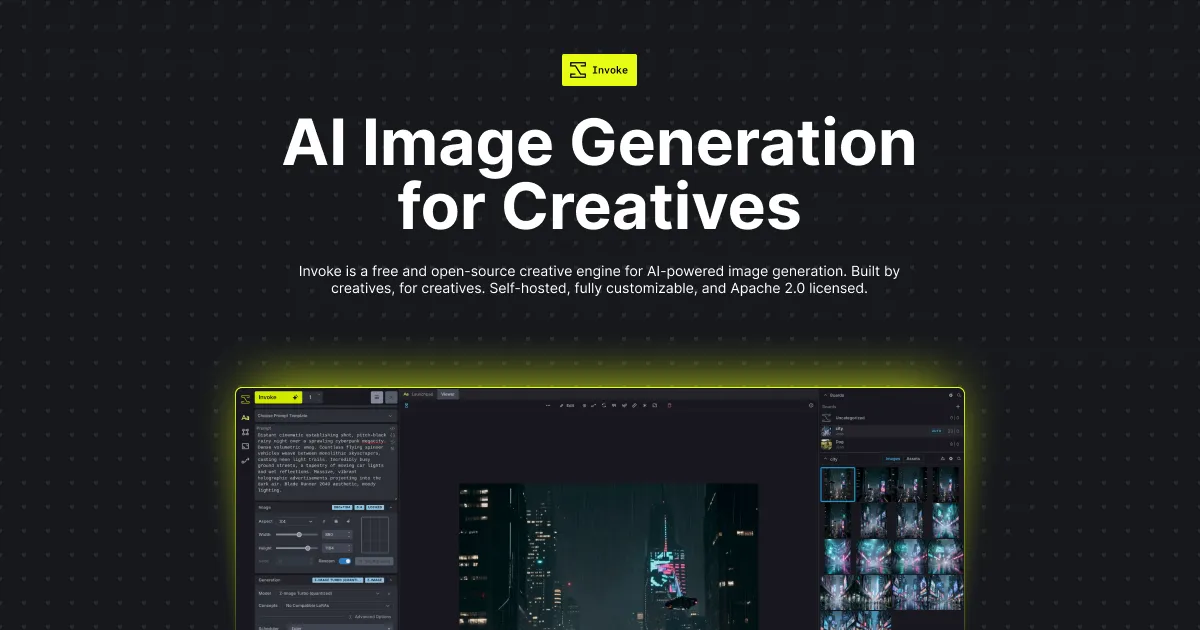

Most people meet AI image generation through a website: type a prompt, wait, download a result, and repeat until a monthly credit balance runs dry. InvokeAI sits at the opposite end of that spectrum. It is a piece of software you install on your own machine, point at your own GPU, and run without a subscription or per-image meter. In the crowded field of AI image generators, it occupies the niche reserved for people who treat generation as a controllable production step rather than a slot-machine pull, and who are willing to manage their own hardware and setup to get that control.
The project is released under the Apache 2.0 license and is completely local. As the vendor puts it, your data, prompts, and creations belong entirely to you. That framing matters for the audience it targets: the appeal is not novelty but ownership of the pipeline. One structural note worth stating up front, because it changes the picture from older writeups: the hosted commercial platform that Invoke once offered has been shut down after the founding team joined Adobe, and the software is now community-maintained. If you are evaluating InvokeAI today, evaluate it as an open-source, self-hosted tool, not as a managed cloud service.
What the software actually gives you
InvokeAI's design is built around two ideas that separate it from a plain prompt box, and understanding both is the key to deciding whether it is worth the setup effort.
- A layer-based canvas. Rather than generating a whole image from text alone, you work on a canvas where you can draw, paint, and sketch, then have the model fill, extend, or reinterpret regions. This is what makes iterative correction possible: instead of re-rolling an entire composition to fix one hand or one corner, you direct the model spatially. For anyone doing concept art or client-facing revisions, that difference is the whole point.
- Node-based workflows. Underneath the interface is a visual graph backend that lets you assemble reproducible pipelines. The value here is repeatability. Once you have a chain that produces a consistent look, you can reuse it and share it rather than trying to remember which exact settings produced a good result last week. This is closer to how compositing or shader tools work than to a consumer app.
- ControlNet. The vendor describes an extensive ControlNet implementation for guiding generations with inputs such as depth maps, edges, and poses. In practice this is how you enforce a specific composition or figure pose instead of hoping the prompt lands it, which is often the deciding factor between "looks nice" and "usable for the brief."
- Batch generation and upscaling. Prompt wildcards and batch runs support rapid iteration, and upscaling is built in. Because there is no per-image cost once the software runs on your own GPU, high-volume iteration is a matter of time and electricity rather than budget, which changes how freely you can experiment.
- A model manager. InvokeAI works with foundational models including Flux, SDXL, and SD 1.5, plus LoRAs, Textual Inversions, and checkpoints, all organized through a built-in model manager. The manager matters more than it sounds: a serious local setup accumulates many multi-gigabyte model files, and keeping them switchable and organized is otherwise tedious.
Who it fits, and who it does not
The natural audience is digital artists, concept designers, and developers who want a controllable local environment and are comfortable managing models and GPU drivers. If your work involves revising the same image many times, enforcing composition through ControlNet, or building a repeatable house style through node workflows, the tool is aimed squarely at you. Researchers and hobbyists who want to experiment with different checkpoints and fine-tunes without cloud limits are also a good match.
It is a poor fit for anyone who wants to generate an image from a phone or a browser with zero setup, for teams that need shared cloud accounts and managed infrastructure (that offering no longer exists), or for users without qualifying hardware. That last point is not a minor caveat.
The real costs of running it yourself
Because the money price is zero, the honest tradeoffs are practical rather than financial:
- Hardware is a hard gate. Per the vendor's own requirements, Windows and Linux need an NVIDIA or AMD GPU, and macOS support is limited to Apple Silicon (M-Series) machines and is explicitly not compatible with Intel Macs. If you do not own qualifying hardware, the software's price being free is irrelevant, because a capable GPU is the actual cost of entry.
- Setup and maintenance fall on you. Installation options include the Invoke Launcher (the fastest route), Docker, and a manual Python install. Even with the launcher, you are responsible for GPU drivers, model downloads, disk space, and updates. There is no support desk behind a hosted plan to fall back on.
- The learning curve is real. The canvas and node workflow are the source of InvokeAI's power, but they are also more to learn than a single prompt field. Getting value out of the graph backend takes deliberate effort.
- No team or collaboration layer is documented. The current site describes a single-machine, local tool. Shared cloud workspaces and multi-seat collaboration are not part of what is publicly offered today.
What it costs
InvokeAI is free and open-source under the Apache 2.0 license, run locally on your own hardware. There are no published paid tiers, and the previously available hosted platform has been shut down. In other words, there is no per-image fee and no subscription, but also no vendor-managed option to pay for; the trade is that you supply and maintain the compute. For a high-volume workflow, self-hosting can be dramatically cheaper over time than a metered cloud service, provided you already have, or are willing to buy, the GPU.
How to think about alternatives
InvokeAI competes on two axes at once: it is a local, private Stable Diffusion runtime, and it is a structured creative environment layered on top. If your priority is only the first axis, other open-source local interfaces for Stable Diffusion and Flux exist and are worth comparing on setup difficulty and the specific model versions they support. If your priority is the second axis but you do not want to manage hardware at all, a hosted, browser-based generator with a subscription will get you producing faster, at the cost of ongoing fees and less control over the pipeline. The decision usually comes down to a single question: do you want to own the workflow and the compute, or rent them? You can browse other options in the image generation category or the broader tools directory to weigh that trade for your own situation.
Common questions
Is InvokeAI free?
Yes. It is free and open-source, licensed under Apache 2.0, and runs locally on your own machine. There are no published paid plans and no per-image charges.
Can I use InvokeAI in the cloud through the official team?
No. The vendor states the Invoke hosted platform has been shut down after the founding team joined Adobe. Today it is a self-hosted, community-maintained project, so you run it on your own hardware.
What computer do I need to run it?
According to the official requirements, Windows 10 or later and Linux both need an NVIDIA or AMD GPU, while macOS support is limited to Apple Silicon (M-Series) machines and is not compatible with Intel Macs. Docker is available for advanced setups.
Which models does it support?
InvokeAI supports foundational models including Flux, SDXL, and SD 1.5, along with LoRAs, Textual Inversions, and checkpoints, all managed through its built-in model manager.
What makes it different from a basic prompt tool?
Its layer-based canvas lets you direct and correct images spatially, and its node-based workflow backend lets you build reproducible generation pipelines, with extensive ControlNet support for guiding results using inputs like depth, edges, and poses.